

Price: ₹499 - ₹240.00
(as of May 05,2023 08:19:09 UTC – Details)

Product Description

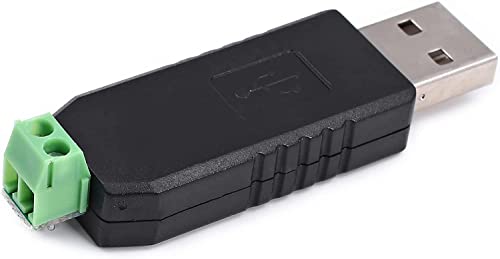
SpiffySky USB to RS485 Converter Adapter
The USB to RS485 Converter Adapter provides an easy to use RS485 interface by means of a Virtual Com Port on the user’s system. There are no command structures; whatever is sent to the Virtual Communication Port is automatically converted to RS485 and vice versa. The module is completely self-powered from the USB bus. This device is plug-and-play. It shows up as a serial/com port and is accessible from applications or hyper-terminal.
This converter provides half-duplex RS-485 communication. The Baud rate range is 75 bps to 115200 bps, maximum up to 6 Mbps. No need of external power supply for operation.
QUICK OVERVIEW
Compliant USB 2.0 standardBaud Rate Range: 75bps – 115200bps, up to 6MbpsSupports Plug, Play and hot-swap (USB side)Communication distance up to 1.2KM
Package Includes :
1 x USB to RS485 Converter Adapter

Applications:
All kinds with RS485 port device parameter settings, data communication
LED display of communication dataMachine PLC data reading and writingMonitoring data read and write, and PTZ controlCentralized control of household electrical appliancesAccess Control System card

Features:
Fully compliant USB 2.0 standard, backward compatible with USB1.1 Support System: Windows XP, Vista, Windows 7, Linux, macOS, and WinCE5.0 drive
Supports Plug, Play and hot-swap (USB side) ;Communication distance up to 1.2KM, with the anti-jamming performance of the industrial siteNo need external power, powered by USB portRS485 connector: to your RS485 deviceNo need external power, powered by USB portFully compliant USB 2.0 standard, backward compatible with USB1.1

Specification:
The color of the device is Black and Screw Terminal are Two. Supported Baud Rate: 75 to 115200
Length (mm): 60 Width (mm): 18 Height (mm): 12Weight (gm): 20Work temperature range: 0°C ~ +65°C & Operating Temperature: StandardCommunication distance: 1200m (max) Supply Voltage: Standard

How to Install the Device Driver
Download CH340 Driver software. Install CH340 Driver. Connect module to PC and check PC’s ‘Device manager’. Open Serial communication software to use send data. It will display CH340. If the computer does not recognize the module, the user needs to uninstall the driver software, then re-install or replace the computer or change the USB port. Insert the RS485 module into the computer, check the mapped serial port number in the “Device Management Department” of the system, then select the corresponding serial port number in your application software, and open the serial port to send and receive data, so simple.